Shopify Order Webhook Relay
Every new Shopify order lands as a clean row in a Google Sheet and pings your team on Discord or Slack. It happens within seconds, never twice, and is never silently lost.
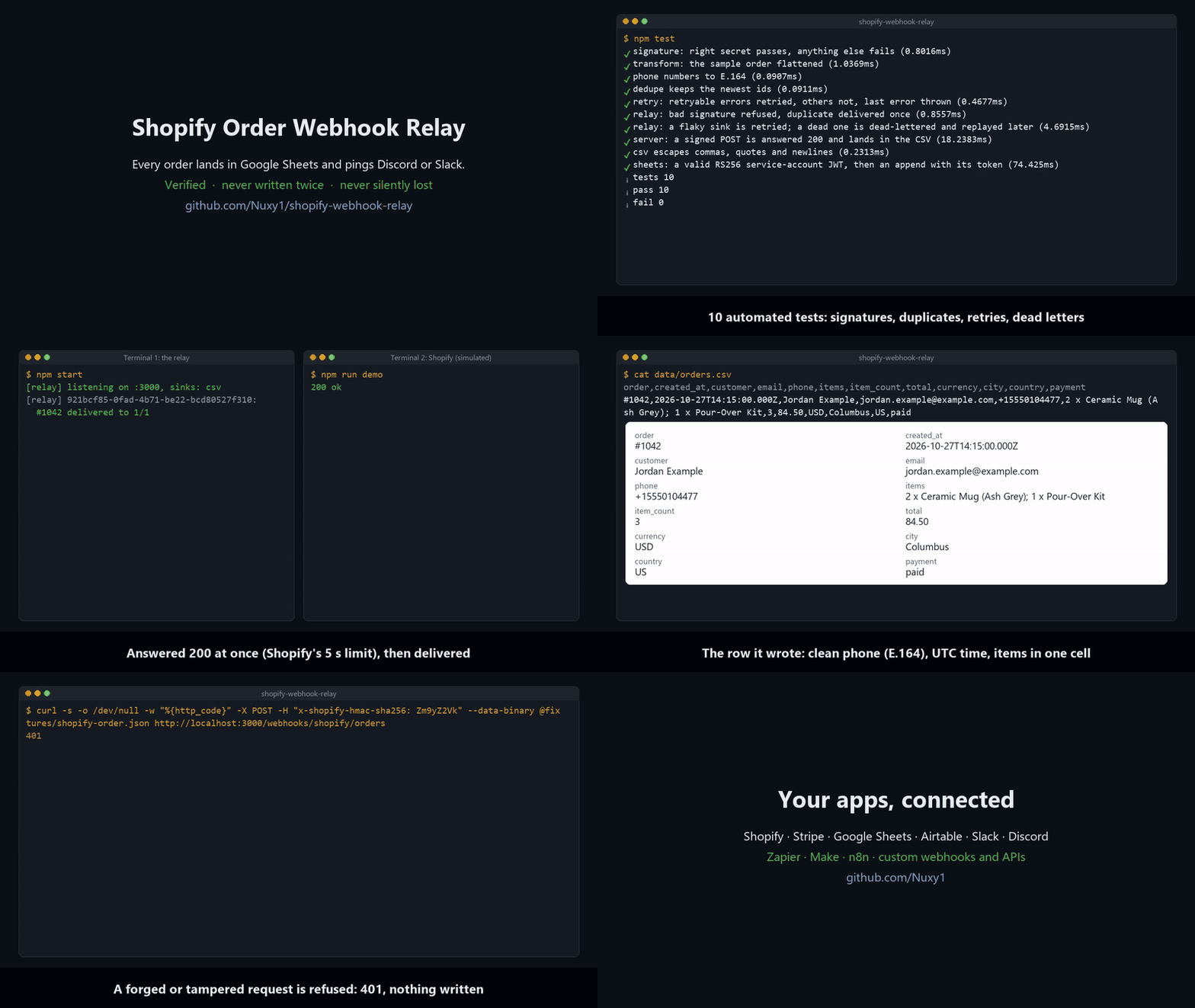
(Diagram: see the README on GitHub.)
What it does
- Verifies every webhook. Shopify’s HMAC-SHA256 signature is checked against the raw body. Forged or tampered requests get a
401and never touch your data. - Answers Shopify at once. Shopify waits only 5 seconds and retries on a timeout, so the relay acknowledges first and delivers after.
- Never writes the same order twice. Shopify delivers at least once, so repeated deliveries are recognised by their webhook id and skipped.
- Retries what fails. Google or Discord down, or a rate limit (
429)? Each destination is retried on its own, with exponential backoff and jitter, honouringRetry-After. A request that can never succeed (400) is not retried. - Loses nothing. A delivery that still fails is written to a dead-letter file. Fix the cause (a revoked key, a renamed tab), then run
npm run replay. Only the destinations that failed are sent again. - Cleans the data. Phone numbers go to E.164, emails are trimmed and lower-cased, times go to UTC ISO 8601, and line items become one readable cell (
2 x Ceramic Mug (Ash Grey); 1 x Pour-Over Kit). - Has no dependencies. It needs only Node.js 22+. Google’s service-account login is done with Node’s own crypto, so there’s no
googleapispackage to keep updated.
The row it writes
| order | created_at | customer | phone | items | item_count | total | currency | city | country | payment | |
|---|---|---|---|---|---|---|---|---|---|---|---|
| #1042 | 2026-10-27T14:15:00.000Z | Jordan Example | jordan.example@example.com | +15550104477 | 2 x Ceramic Mug (Ash Grey); 1 x Pour-Over Kit | 3 | 84.50 | USD | Columbus | US | paid |
Try it in one minute (no accounts needed)
npm test              # 10 tests: signatures, duplicates, retries, dead letters, the HTTP server, the Sheets login
npm start             # terminal 1: listens on :3000 with the CSV backup only
npm run demo          # terminal 2: sends the sample order, signed as Shopify signs it
cat data/orders.csv   # the row
Set it up for a store
- Configure the relay. Copy
.env.exampleto.env. - Google Sheets (optional):
- In Google Cloud, create a service account and download its JSON key.
- Share the spreadsheet with the key’s
client_emailas an Editor. - Set
SHEET_ID(from the sheet’s URL),SHEET_RANGE(for exampleOrders!A1) andGOOGLE_SERVICE_ACCOUNT(the key file’s path, or its JSON).
- Discord or Slack (optional): create an incoming webhook and put its URL in
NOTIFY_WEBHOOK_URL. - Deploy to any Node host with HTTPS (Render, Railway, Fly.io, a VPS behind Caddy). Shopify only calls HTTPS URLs.
- Connect Shopify:
- In the Shopify admin, go to Settings > Notifications > Webhooks and create an
Order creationwebhook in JSON. Point it athttps://<your-host>/webhooks/shopify/orders. - Copy the signing secret shown there into
SHOPIFY_WEBHOOK_SECRET.
- In the Shopify admin, go to Settings > Notifications > Webhooks and create an
- Check it:
GET /healthanswersok. Then place a test order.
Project layout
src/verify.js       HMAC check (timing-safe)
src/transform.js    order -> row, phone normalisation
src/relay.js        verify, dedupe, acknowledge, deliver, dead-letter, replay
src/retry.js        backoff with jitter; which HTTP errors are worth retrying
src/sinks/          sheets.js (service-account JWT + append), notify.js (Discord/Slack), csv.js
src/server.js       node:http server, 1 MB body limit, graceful shutdown that finishes acknowledged deliveries
scripts/            send-test-webhook.js, replay-dead-letters.js
Notes for production
- Duplicate detection is kept in memory, which is right for one instance. Behind a load balancer with several instances, move it to Redis or a database table.
- The CSV backup and the dead letters hold customer details. Keep
data/on private storage, and rotate or delete it as the store’s privacy policy requires. - To add another destination (Airtable, HubSpot, an email), add one file in
src/sinks/that exposeswrite(values, row).